Pages

Wednesday, July 5, 2023

Updating the vCenter Server Appliance via CLI and Offline Patch ISO.

***Before starting the patching activity, in case of vCenter in ELM need to shutdown and take offline snapshot for all the vCenters in ELM . So that if rollback require there is working state to revert back, during vCenter patch activity recommended to pause VM backups.


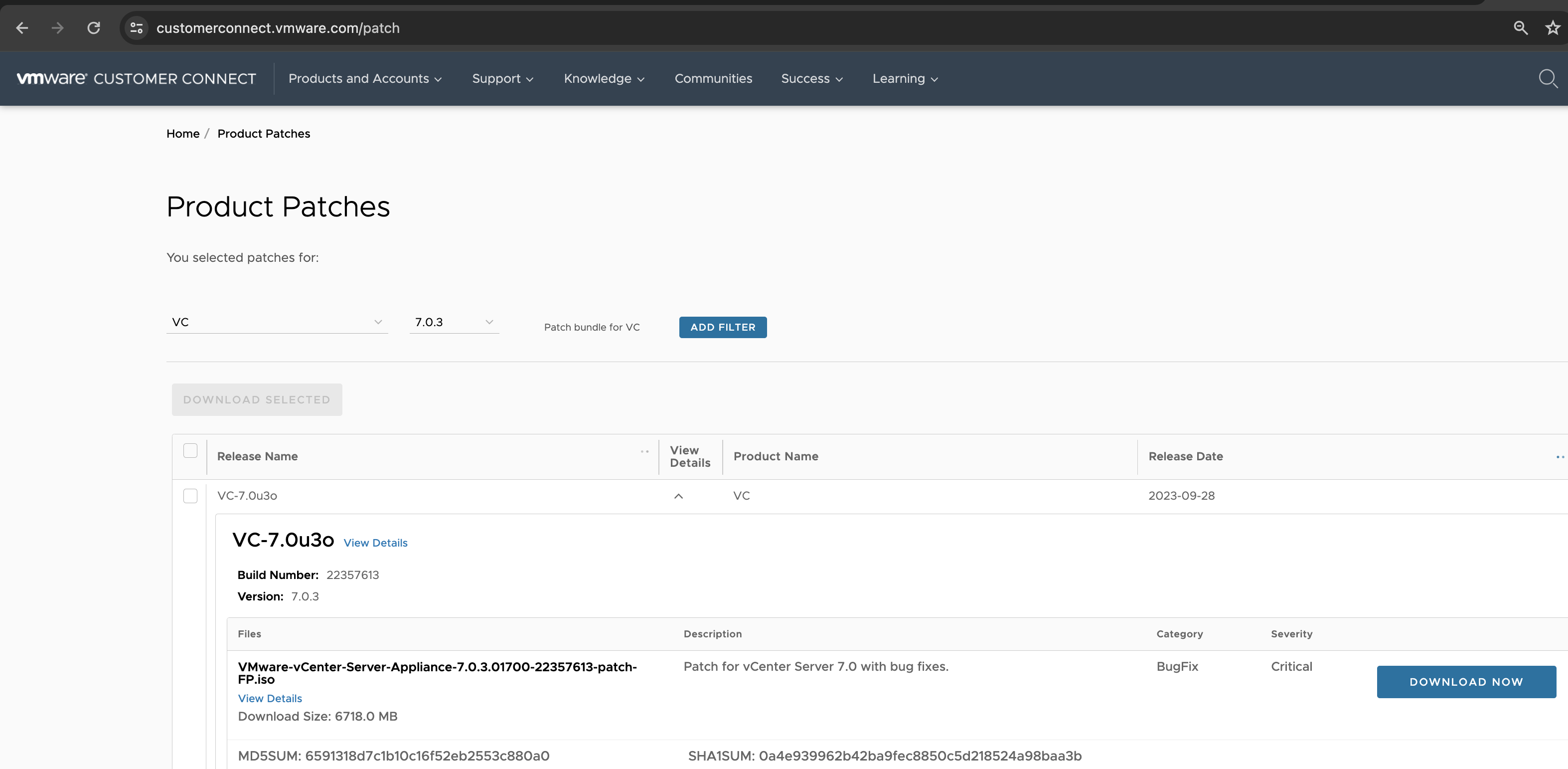
Download patch ISO from VMware Patch download page, by logging with your customer connect credential.

https://customerconnect.vmware.com/patch (for example see screenshot below):


1. Find venter VM and note ESXi host it is running on. Put DRS Automation in manual mode if host part of DRS cluster.

2. Connect ESXi host UI on which vCenter VM is running.

3. Shutdown vCenter VM.


4. Take snapshot of VM.


5. PowerON vCenter VM


6. Mount vCenter latest patch iso 


7.  SSH to vCenter 


Check the shell

If not on Vcenter appliance shell prompt.

Run this appliancesh

If already on Vcenter shell then run below commands.

Be on below prompt of venter appliance.


Command>


Run the below commands one by one.


Command> software-packages stage --iso --acceptEulas


Command> software-packages list --staged


Command> software-packages install --staged


After successful upgrade, this will reboot venter VM, wait for all the service come up.


To check version of vCenter after patch you can run the command (from bash shell) 


Type shell and press Enter


vpxd -vl


To check service status on vcenter server run below command:


service-control --status


This completes the vCenter patch activity. You can remove snapshot as per your org policy. Keeping snapshot for longtime not recommended.


Monday, May 22, 2023

Enable SSH on NSX-T manger using CLI

 Login to NSX-T manager using admin account from the console

To start just for current session:

nsxmanager> start service ssh

To keep service started even after reboot:

nsxmanager> set service ssh start-on-boot

To check service status:

nsxmanager> get service ssh

To see the list of all services:

nsxmanager> get services


Tuesday, April 4, 2023

Check TCP/UDP port connectivity from ESXi host

Run below command from esxi shell:

For TCP Port:

nc -vz x.x.x.x/name Port

example: if you want to check connectivity from esxi to 10.10.10.10 and TCP port (8000).

nc -vz  10.10.10.10 8000

Connection to 10.10.10.10 8000 port [tcp/*] succeeded!

For UDP Port:

nc -vz -u x.x.x.x/name Port

example: if you want to check connectivity from esxi to Syslog server (10.10.10.10) and UDP port (514).

nc -vz -u 10.10.10.10 514

Connection to 10.10.10.10 514 port [udp/*] succeeded!


VMware Appliances Reset Forget|Expired passwords

To check current password policy:

chage -l root


To change password expiry policy to never expire you can use below command:


chage -M -1 root


vROPS

————


vROPS Admin Account:


https://kb.vmware.com/s/article/2078313


vROPS root Account:


https://kb.vmware.com/s/article/2001476


Unlock Admin Account 


https://kb.vmware.com/s/article/2131633


vRLI

————

vRLI root Account:


https://kb.vmware.com/s/article/53649


vRLI admin Account:


https://docs.vmware.com/en/vRealize-Log-Insight/8.2/com.vmware.log-insight.administration.doc/GUID-48C871F8-6289-406C-9C9A-59E4EA1AF2E5.html


vCenter:

—————


vCenter Root Account:


https://kb.vmware.com/s/article/2147144


vCenter Administrator@vsphere.local Account:


https://kb.vmware.com/s/article/2146224


vRA

—————


How to reset administrator@vsphere.local account password in vRA 7.x. (2150055)


https://kb.vmware.com/s/article/2150055#:~:text=Navigate%20to%20vRA%20Settings%20%3E%20SSO,Save%20settings


vRA root password


https://docs.vmware.com/en/vRealize-Automation/8.8/Administering/GUID-1BC4BD89-73C5-4C2A-875D-B8787418EE85.html#:~:text=At%20the%20root%20%5B%2F%5D%23,and%20press%20the%20Enter%20key


SRM 


SRM Appliance root pass


https://kb.vmware.com/s/article/304686


Wednesday, February 9, 2022

SRM Appliance Deployment not taking IP details


In case appliance not taking IP details as provided during the OVA deployment, use below commands from the console:


Login to appliance using root account.


Find out the interface names using below command: 


/opt/vmware/share/vami/vami_interfaces 


Configure P for the interface: 


/opt/vmware/share/vami/vami_set_network <interface name as per command output> STATICV4 <IPAddress> <NetMask> <Default Gateway>


Configure DNS IP:


/opt/vmware/share/vami/vami_set_dns -d <Domain Sufffix> <DNS ip1> <DNS ip2>


Configure  Hostname


hostnamectl set-hostname your-new-hostname


Now you can reboot your appliance and then connect using the given IP using VAMI UI.


Monday, July 13, 2020

Bucket Policy vs IAM Policy vs S3 ACL !

IAM Policies and Bucket Policies and ACLs! Oh, My! (Controlling Access to S3 Resources)


One of most commonly asked question and very confusing. I came across a blog from AWS, with great explanation on same. So though of sharing:

IAM policies vs. S3 bucket policies

IAM policies specify what actions are allowed or denied on what AWS resources (e.g. allow ec2:TerminateInstance on the EC2 instance with instance_id=i-8b3620ec). You attach IAM policies to IAM users, groups, or roles, which are then subject to the permissions you’ve defined. In other words, IAM policies define what a principal can do in your AWS environment.

S3 bucket policies, on the other hand, are attached only to S3 buckets. S3 bucket policies specify what actions are allowed or denied for which principals on the bucket that the bucket policy is attached to (e.g. allow user Alice to PUT but not DELETE objects in the bucket). S3 bucket policies are a type of access control list


AWS Security Fundamentals

To start learning AWS Security, start with free digital fundamental training.AWS Security Fundamentals (2nd Edition):

https://www.aws.training/Details/eLearning?id=34259

Later to go more deep dive you can go for 3 days training on Security Engineering on AWS.

https://www.koenig-solutions.com/security-engineering-on-aws-training-certification-course#:~:text=The%20Security%20Engineering%20on%20AWS,%2C%20networking%2C%20and%20database%20services.